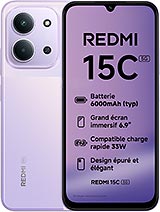
Download Xiaomi Redmi 15C 5G / 15R 5G Firmware ROM TWRP

Download the firmware/ROM flash for Xiaomi Redmi 15C 5G / 15R 5G with the code is tornado. Please make sure the code is exact. You can check model code by command fastboot getvar product in Fastboot mode. This MIUI version of Firmware/ROM is OS4.0.8.0.XPOMIXM and Android version is 17.0. This Firmware/ROM size is 5.6G.

Xiaomi Redmi 15C 5G / 15R 5G may called with other names like . China ROM, Firmware is for China region, there are only English, Chinese and No Google Services. Global ROM, Firmware is for Global region and almost can flash for China phone with unlocked bootloader. They have multilanguage and Google Services, china apps removed. All file download from MiFirm is Free. Fastboot firmware, ZIP firmware is official from Xiaomi. EU ROM, TWRP and Other files is unofficial. Use at your own risk.

ID
29918
File type
Global Stable
Model
tornado
Model name
MIUI version
OS4.0.8.0.XPOMIXM
File name
tornado_global-ota_full-OS4.0.8.0.XPOMIXM-user-17.0-2e65cd863e.zip
Android version
17.0
File size
5.6G
MD5
2e65cd863e53e9243b56c1bc4717da2b
Downloaded
7
Basic experience
  • Reduced system load and memory use for lasting smooth performance
  • New: Precision workload scheduling helps optimize system-wide performance
  • Optimization: System workload scheduling handles tasks more efficiently, while redundant instructions have been removed to improve performance and reduce power consumption
  • Optimization: CPU processing and GPU rendering workloads consume less power
  • Optimization: Graphics rendering reduces UI power consumption and stuttering
  • Optimization: Game frequency scaling delivers more stable frame rates in demanding scenarios such as team battles
  • New: Memory preloading helps apps respond faster
  • Optimization: Memory reservation and allocation reduce resource use and memory usage after startup
  • Optimization: Background resource scheduling loads resources only when needed and staggers background tasks to reduce memory use and improve performance
  • Optimization: Memory preloading and storage prefetching reduce occasional stuttering and frame drops, speed up cold starts, and improve app responsiveness
  • New: Xiaomi HyperOS app runtime environment helps system apps run more smoothly and use resources more efficiently
  • Optimization: Home screen and Gallery interactions provide smoother visuals and more responsive controls
  • Optimization: Gallery and Weather use fewer CPU and memory resources in the background
Alive Design Philosophy
  • Refreshed system visuals for a more polished look
  • New: Notifications can appear in stacks on the Lock screen and at the bottom of the Notification shade for easier access and smoother animations
  • New: You can resize Home screen folders by dragging their edges
  • New: System apps use an adaptive floating layout with a refreshed design that adjusts to different screen sizes for more immersive browsing and clearer navigation

Redmi 15C 5G / 15R 5G (tornado) specifications
Not announced yet
205g, 8mm thickness
Android 15, HyperOS 2
128GB/256GB storage, microSDXC

Redmi 15C 5G / 15R 5G was announced at Not announced yet with Android 15, HyperOS 2, It have 128GB 4GB RAM, 256GB 4GB RAM storage and there are colors: Blue, Violet, Gray

NETWORK
Technology
GSM / HSPA / LTE / 5G
2G
GSM 850 / 900 / 1800 / 1900
3G
HSDPA 850 / 900 / 2100
4G
LTE
5G
SA/NSA
Speed
HSPA, LTE, 5G
TIMELINE
Announced
Not announced yet
Released
Not announced yet
BODY
Dimensions
171.6 x 79.5 x 8 mm (6.76 x 3.13 x 0.31 in)
Weight
205 g (7.23 oz)
Build
Glass front (Gorilla Glass 3), plastic frame, glass back or silicone polymer (eco leather) back
SIM
Nano-SIM + Nano-SIM
DISPLAY
Type
IPS LCD, 120Hz
Size
6.9 inches, 114.9 cm2 (~84.3% screen-to-body ratio)
Resolution
720 x 1600 pixels, 20:9 ratio (~254 ppi density)
Protection
Corning Gorilla Glass 3
PLATFORM
OS
Android 15, HyperOS 2
MEMORY
Card slot
microSDXC (dedicated slot)
Internal
128GB 4GB RAM, 256GB 4GB RAM
MAIN CAMERA
Camera
50 MP, f/1.8, 28mm (wide), 1/2.76", 0.64µm, PDAF
QVGA, f/3.0
Features
LED flash, HDR
Video
1080p@30fps
FRONT CAMERA
Camera
8 MP, f/2.0, (wide), 1/4.0", 1.12µm
Features
HDR
Video
1080p@30fps
SOUND
Loudspeaker
Yes
3.5mm jack
Yes
COMMUNICATES
WLAN
Wi-Fi 802.11 a/b/g/n/ac, dual-band
Bluetooth
5.4, A2DP, LE
GPS
GPS, GLONASS, GALILEO, BDS
NFC
Yes (market/region dependent)
Radio
FM radio
USB
USB Type-C 2.0, OTG
FEATURES
Sensors
Fingerprint (side-mounted), accelerometer, compass
Virtual proximity sensing
BATTERY
Battery
6000 mAh
Charging
33W wired, PD
MISC
Colors
Blue, Violet, Gray

Specs source: gsmarena.com
Disclaimer: We can not guarantee that the information on this page is 100% correct


How to flash Xiaomi Redmi 15C 5G / 15R 5G Firmware ROM

1. If Fastboot firmware. The ext. must be tgz. If not. Rename it from .gz to .tgz. Extract it by WinRAR

2. For Fastboot firmware. Download XiaomiFlash lastest. Extract tool after downloaded

3. Open XiaoMiFlash.exe. Install driver if tool required. Press select and select to firmware/ROM folder what includes flash_all.bat

4. Make sure your phone are unlocked bootloader. Or you must bring your phone to EDL mode (9008) to flash

5. Bring phone to Fastboot mode by hold Power and Volume down for 5-10s. Release button when It show Fastboot

6. Connect Phone to Computer. Press Refresh to scan device. If a device showed is Ok

7. Tick clean all (very important). If not, your phone will LOCKED BOOTLOADER after flash done

8. Press Flash and wait util it show success or any error

ZIP. ZIP ROM using Update function in System or TWRP

EU. EU ROM flash using TWRP

Read more

How to unlock bootloader Xiaomi Redmi 15C 5G / 15R 5G

After unlock bootloader the device, your phone becomes more vulnerable and less secure to malware attacks, which may lead to the disclosure and loss of your private data. Some features which require high security level (ex: Find device, added-value services, etc.) may no longer be available. Phone data like Photo, Contacts, SMS or application's data will be lost. Use at your own risk

1. Login with Mi account on your Xiaomi phone. Go to Setting - Phone information - Tap 7 times to MIUI version. It will notice developer options enabled

2. Go to Setting - Additional settings - Developer options - Mi Unlock status. Press Add account and wait to success notice. (This step require SIM card and mobile data enable)

3. Download the Mi Unlock app to PC, and sign in with the Mi account which are loged in your Mi phone

4. Shutdown your phone manually, then hold Power and Volume down button to enter Fastboot mode

5. Connect your phone with the PC using USB cable and click Unlock

Read more

Comment with us
SUPPORT MIFIRM

Help keep firmware downloads free

Ads may be blocked in your browser. Allow ads on MiFirm to help cover our server costs.