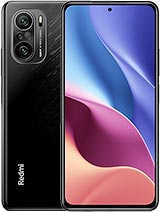
Tải xuống Xiaomi Redmi K40 Pro/K40 Pro+/POCO F3 Pro/Mi 11i Firmware ROM TWRP

Tải gói firmware/ROM cho Xiaomi Redmi K40 Pro/K40 Pro+/POCO F3 Pro/Mi 11i với mã là haydn. Hãy chắc chắn rằng mã chính xác. Bạn có thể kiểm tra bằng câu lệnh fastboot getvar product trong chế độ Fastboot. Phiên bản MIUI của Firmware/ROM này là 22.6.29 và phiên bản Android là 12. Kích thước Firmware/ROM này là 3.74 GB.

Xiaomi Redmi K40 Pro/K40 Pro+/POCO F3 Pro/Mi 11i may called with other names like M2012K11C. China ROM, Firmware is for China region, there are only English, Chinese and No Google Services. Global ROM, Firmware is for Global region and almost can flash for China phone with unlocked bootloader. They have multilanguage and Google Services, china apps removed. All file download from MiFirm is Free. Fastboot firmware, ZIP firmware is official from Xiaomi. EU ROM, TWRP and Other files is unofficial. Use at your own risk.

ID
9106
Loại tập tin
EU Nhà phát triển Recovery
Đời máy
haydn
Tên đời máy
Phiên bản MIUI
22.6.29
Tên tập tin
xiaomi.eu_multi_HMK40Pro_MI11i_22.6.29_v13-12.zip
Phiên bản Android
12
Kích thước
3.74 GB
MD5
9902cf6e71f69ade75453c80e52b6436
Đã tải xuống
29

Redmi K40 Pro/K40 Pro+/POCO F3 Pro/Mi 11i (haydn) thông số
Released 2021, March 04
196g, 7.8mm thickness
Android 11, MIUI 12
128GB/256GB storage, no card slot

Redmi K40 Pro/K40 Pro+/POCO F3 Pro/Mi 11i được ra mắt vào 2021, February 25 cùng với Android 11, MIUI 12, có bộ xử lý Qualcomm SM8350 Snapdragon 888 5G (5 nm) CPU Octa-core (1x2.84 GHz Kryo 680 & 3x2.42 GHz Kryo 680 & 4x1.80 GHz Kryo 680) và GPU Adreno 660. Nó có 128GB 6GB RAM, 128GB 8GB RAM, 256GB 8GB RAM, 256GB 12GB RAM bộ nhớ và có các màu: Black, White, Aurora

MẠNG
Công nghệ
GSM / CDMA / HSPA / CDMA2000 / LTE / 5G
2G
GSM 850 / 900 / 1800 / 1900 - SIM 1 & SIM 2
3G
HSDPA 850 / 900 / 1700(AWS) / 1900 / 2100
4G
1, 2, 3, 4, 5, 7, 8, 12, 17, 18, 19, 20, 26, 28, 34, 38, 39, 40, 41, 42
5G
1, 3, 28, 41, 77, 78 SA/NSA/Sub6
Tốc độ
HSPA 42.2/5.76 Mbps, LTE-A, 5G
MỐC THỜI GIAN
Công bố
2021, February 25
Phát hành
Released 2021, March 04
THÂN MÁY
Kích thước
163.7 x 76.4 x 7.8 mm (6.44 x 3.01 x 0.31 in)
Trọng lượng
196 g (6.91 oz)
SIM
Dual SIM (Nano-SIM, dual stand-by)
HIỂN THỊ
Loại
Super AMOLED, 120Hz, HDR10+, 1300 nits (peak)
Kích thước
6.67 inches, 107.4 cm2 (~85.9% screen-to-body ratio)
Độ phân giải
1080 x 2400 pixels, 20:9 ratio (~395 ppi density)
Bảo vệ
Corning Gorilla Glass 5
NỀN TẢNG
OS
Android 11, MIUI 12
Bộ xử lý
Qualcomm SM8350 Snapdragon 888 5G (5 nm)
CPU
Octa-core (1x2.84 GHz Kryo 680 & 3x2.42 GHz Kryo 680 & 4x1.80 GHz Kryo 680)
GPU
Adreno 660
BỘ NHỚ
Khe cắm thẻ
No
Trong
128GB 6GB RAM, 128GB 8GB RAM, 256GB 8GB RAM, 256GB 12GB RAM
UFS 3.1
CAMERA CHÍNH
Máy ảnh
64 MP, f/1.9, 26mm (wide), 1/1.7", 0.8µm, PDAF
8 MP, f/2.2, 119˚ (ultrawide)
5 MP, f/2.4, 50mm (macro), 1/5.0", 1.12µm
Đặc trưng
LED flash, HDR, panorama
Video
8K@30fps, 4K@30/60fps, 1080p@30/60/120/240/960fps, gyro-EIS, HDR10+
CAMERA TRƯỚC
Máy ảnh
20 MP, f/2.5, (wide), 1/3.4", 0.8µm
Đặc trưng
HDR
Video
1080p@30fps, 720p@120fps
ÂM THANH
Loa ngoài
Yes, with stereo speakers
Cổng 3.5mm
No
24-bit/192kHz audio
GIAO TIẾP
WLAN
Wi-Fi 802.11 a/b/g/n/ac/6e, dual-band, Wi-Fi Direct, hotspot
Bluetooth
5.2, A2DP, LE
GPS
Yes, with dual-band A-GPS, GLONASS, BDS, GALILEO, QZSS, NavIC
NFC
Yes
Radio
No
USB
USB Type-C 2.0, USB On-The-Go
TÍNH NĂNG
Cảm biến
Fingerprint (side-mounted), accelerometer, gyro, proximity, compass, color spectrum, barometer
PIN
Pin
Li-Po 4520 mAh, non-removable
Sạc
Fast charging 33W, 100% in 52 min (advertised)
Power Delivery 3.0
Quick Charge 3+
KHÁC
Màu
Black, White, Aurora

Nguồn thông số: gsmarena.com
Tuyên bố miễn trừ: Chúng tôi không thể đảm bảo rằng thông tin trên trang này là chính xác 100%

Nạp Firmware ROM Xiaomi Redmi K40 Pro/K40 Pro+/POCO F3 Pro/Mi 11i như thế nào

1. If Fastboot firmware. The ext. must be tgz. If not. Rename it from .gz to .tgz. Extract it by WinRAR

2. Với ROM Fastboot. Download XiaomiFlash mới nhất. Giải nén phần mềm sau khi download

3. Mở XiaoMiFlash.exe. Cài driver nếu phần mềm yêu cầu. Bấm select và chọn tới thư mục ROM/Firmware nơi mà chứa tệp tên là flash_all.bat

4. Chắc chắn điện thoại của bạn đã mở khoá bootloader. Hoặc bạn phải đưa máy về EDL (9008) để nạp

5. Đưa điện thoại về chế độ Fastboot bằng cách giữ Nguồngiảm âm lượng từ 5-10 giây. Nhả phím khi đã hiện Fastboot

6. Kết nối điện thoại tới máy tính. Bấm Refresh để kiểm tra thiết bị. Nếu có thiết bị hiện lên là được

7. Đánh dấu clean all (rất quan trọng). Nếu không, điện thoại bạn sẽ KHOÁ BOOTLOADER sau khi nạp xong

8. Bấm Flash và đợi tới khi hiện thị thành công hoặc lỗi gì đó

ZIP. ROM ZIP dùng chức năng Cập nhật trong hệ thống hoặc TWRP

EU. ROM EU nạp bằng TWRP

Đọc thêm

Mở khoá bootloader Xiaomi Redmi K40 Pro/K40 Pro+/POCO F3 Pro/Mi 11i như thế nào

After unlock bootloader the device, your phone becomes more vulnerable and less secure to malware attacks, which may lead to the disclosure and loss of your private data. Some features which require high security level (ex: Find device, added-value services, etc.) may no longer be available. Phone data like Photo, Contacts, SMS or application's data will be lost. Use at your own risk

1. Login with Mi account on your Xiaomi phone. Go to Setting - Phone information - Tap 7 times to MIUI version. It will notice developer options enabled

2. Go to Setting - Additional settings - Developer options - Mi Unlock status. Press Add account and wait to success notice. (This step require SIM card and mobile data enable)

3. Download the Mi Unlock app to PC, and sign in with the Mi account which are loged in your Mi phone

4. Shutdown your phone manually, then hold Power and Volume down button to enter Fastboot mode

5. Connect your phone with the PC using USB cable and click Unlock

Đọc thêm

Bình luận với chúng tớ

I am so sorry! 😟

But please disable AdBlock. Because MiFirm is Free. But we need money to keep server running. Ads is only benifit for keep MiFirm running Free. Thank you!

👍 Understood. I turned it off ❓ How to disable AdBlock/AdBlockPlus? 😔 I do not want to help

How to disable AdBlock

Adblock / Adblock Plus   
  • Click AdBlock or AdBlock Plus icon at the browser menu.
  • Click Don't run on pages on this site. or Enabled on this site then press Exclude or Switch off BLOCK ADS ON