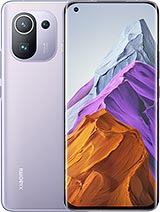
Download Xiaomi Mi 11 Pro/Ultra Firmware ROM TWRP

Unduh flash firmware / ROM untuk Xiaomi Mi 11 Pro/Ultra dengan kode tersebut star. Harap pastikan kodenya tepat. Anda dapat memeriksa kode model dengan perintah fastboot getvar product dalam mode Fastboot. Firmware / ROM versi MIUI ini adalah V14.0.9.0.TKACNXM dan versi Android 13.0. Ukuran Firmware / ROM ini adalah 6.7G.

Xiaomi Mi 11 Pro/Ultra may called with other names like M2102K1C, M2102K1G. China ROM, Firmware is for China region, there are only English, Chinese and No Google Services. Global ROM, Firmware is for Global region and almost can flash for China phone with unlocked bootloader. They have multilanguage and Google Services, china apps removed. All file download from MiFirm is Free. Fastboot firmware, ZIP firmware is official from Xiaomi. EU ROM, TWRP and Other files is unofficial. Use at your own risk.

ID
9986
Jenis Berkas
China Stable
model/jenis
star
Nama Model
Versi MIUI
V14.0.9.0.TKACNXM
Nama Berkas
star_images_V14.0.9.0.TKACNXM_20230515.0000.00_13.0_cn_1255b6ef64.tgz
Versi Android
13.0
Ukuran Berkas
6.7G
MD5
1255b6ef64fe5a8e8358597686e38aa0
Terunduh
783
Other
  • Optimized system performance
  • Improved system security and stability

Mi 11 Pro/Ultra (star) specifications
Released 2021, April 02
208g, 8.5mm thickness
Android 11, MIUI 12.5
128GB/256GB storage, no card slot

Mi 11 Pro/Ultra was announced at 2021, March 29 with Android 11, MIUI 12.5, have chipset Qualcomm SM8350 Snapdragon 888 5G (5 nm) CPU Octa-core (1x2.84 GHz Kryo 680 & 3x2.42 GHz Kryo 680 & 4x1.80 GHz Kryo 680) and GPU Adreno 660. It have 128GB 8GB RAM, 256GB 8GB RAM, 256GB 12GB RAM storage and there are colors: Black, Green, Purple

NETWORK
Technology
GSM / CDMA / HSPA / EVDO / LTE / 5G
2G
GSM 850 / 900 / 1800 / 1900 - SIM 1 & SIM 2
3G
HSDPA 850 / 900 / 1700(AWS) / 1900 / 2100
4G
1, 2, 3, 4, 5, 7, 8, 12, 17, 18, 19, 20, 26, 28, 34, 38, 39, 40, 41, 42 - China
5G
1, 3, 28, 41, 77, 78, 79 SA/NSA - China
Speed
HSPA 42.2/5.76 Mbps, LTE-A, 5G
TIMELINE
Announced
2021, March 29
Released
Released 2021, April 02
BODY
Dimensions
164.3 x 74.6 x 8.5 mm (6.47 x 2.94 x 0.33 in)
Weight
208 g (7.34 oz)
SIM
Dual SIM (Nano-SIM, dual stand-by)
DISPLAY
Jenis
AMOLED, 1B colors, 120Hz, HDR10+, Dolby Vision, 1500 nits (peak)
Size
6.81 inches, 112.0 cm2 (~91.4% screen-to-body ratio)
Resolution
1440 x 3200 pixels, 20:9 ratio (~515 ppi density)
Protection
Corning Gorilla Glass Victus
PLATFORM
OS
Android 11, MIUI 12.5
Chipset
Qualcomm SM8350 Snapdragon 888 5G (5 nm)
CPU
Octa-core (1x2.84 GHz Kryo 680 & 3x2.42 GHz Kryo 680 & 4x1.80 GHz Kryo 680)
GPU
Adreno 660
MEMORY
Card slot
No
Internal
128GB 8GB RAM, 256GB 8GB RAM, 256GB 12GB RAM
UFS 3.1
MAIN CAMERA
Camera
50 MP, f/2.0, 24mm (wide), 1/1.12", 1.4µm, Dual Pixel PDAF, OIS
8 MP, 120mm (periscope telephoto), PDAF, OIS, 5x optical zoom
13 MP, f/2.4, 16mm, 123˚ (ultrawide)
Features
LED flash, HDR, panorama
Video
8K@24fps, 4K@30/60fps, 1080p@30/60fps, gyro-EIS, HDR10+ rec.
FRONT CAMERA
Camera
20 MP, f/2.2, 27mm (wide), 1/3.4", 0.8µm
Features
HDR, panorama
Video
1080p@30/60fps, 720p@120fps, gyro-EIS
SOUND
Loudspeaker
Yes, with stereo speakers
3.5mm jack
No
24-bit/192kHz audio
Tuned by Harman Kardon
COMMUNICATES
WLAN
Wi-Fi 802.11 a/b/g/n/ac/6e, dual-band, Wi-Fi Direct, DLNA, hotspot
Bluetooth
5.2, A2DP, LE, aptX HD
GPS
Yes, with dual-band A-GPS, GLONASS, GALILEO, QZSS, NavIC, BDS (tri-band)
NFC
Yes
Radio
No
USB
USB Type-C 2.0, USB On-The-Go
FEATURES
Sensors
Fingerprint (under display, optical), accelerometer, gyro, proximity, color spectrum, compass
BATTERY
Battery
Li-Po 5000 mAh, non-removable
Charging
Fast charging 67W, 100% in 36 min (advertised)
Fast wireless charging 67W, 100% in 39 min (advertised)
Reverse wireless charging 10W
Quick Charge 4+
Power Delivery 3.0
MISC
Colors
Black, Green, Purple

Specs source: gsmarena.com
Disclaimer: We can not guarantee that the information on this page is 100% correct


How to flash Xiaomi Mi 11 Pro/Ultra Firmware ROM

1. If Fastboot firmware. The ext. must be tgz. If not. Rename it from .gz to .tgz. Extract it by WinRAR

2. Untuk ROM Fastboot. Unduh XiaomiFlash terbaru. Ekstrak alat setelah diunduh

3. Buka XiaoMiFlash.exe. Instal driver jika diperlukan alat. Tekan pilih dan pilih ke folder firmware / ROM yang termasuk flash_all.bat

4. Pastikan ponsel Anda tidak terkunci bootloadernya. Atau Anda harus melakukan testpoint ponsel Anda ke mode EDL (9008) untuk mem-flash

5. Masukkan ponsel ke mode Fastboot dengan ditahan Tombol Power dan Volume bawah sekitar 5-10 detik. Lepaskan tombol ketika sudah masuk ke Fastboot

6. Hubungkan Ponsel ke Komputer. Tekan Refresh untuk memindai perangkat. Jika perangkat sudah tertampil maka OK

7. Centang clean all (sangat penting). Jika tidak, ponselmu akan LOCKED BOOTLOADER setelah selesai flashing

8. Tekan Flash dan tunggu hingga tanda selesai atau tanda eror

ZIP. ZIP ROM menggunakan fungsi Pembaruan dalam Sistem atau TWRP

EU. ROM EU flash menggunakan TWRP

Read more

How to unlock bootloader Xiaomi Mi 11 Pro/Ultra

After unlock bootloader the device, your phone becomes more vulnerable and less secure to malware attacks, which may lead to the disclosure and loss of your private data. Some features which require high security level (ex: Find device, added-value services, etc.) may no longer be available. Phone data like Photo, Contacts, SMS or application's data will be lost. Use at your own risk

1. Login with Mi account on your Xiaomi phone. Go to Setting - Phone information - Tap 7 times to MIUI version. It will notice developer options enabled

2. Go to Setting - Additional settings - Developer options - Mi Unlock status. Press Add account and wait to success notice. (This step require SIM card and mobile data enable)

3. Download the Mi Unlock app to PC, and sign in with the Mi account which are loged in your Mi phone

4. Shutdown your phone manually, then hold Power and Volume down button to enter Fastboot mode

5. Connect your phone with the PC using USB cable and click Unlock

Read more

Beri komentar dengan kami

I am so sorry! 😟

But please disable AdBlock. Because MiFirm is Free. But we need money to keep server running. Ads is only benifit for keep MiFirm running Free. Thank you!

👍 Understood. I turned it off ❓ How to disable AdBlock/AdBlockPlus? 😔 I do not want to help
❌

How to disable AdBlock

Adblock / Adblock Plus   
  • Click AdBlock or AdBlock Plus icon at the browser menu.
  • Click Don't run on pages on this site. or Enabled on this site then press Exclude or Switch off BLOCK ADS ON